Translate This Page
Guide (step-by-step): How to Jailbreak iPhone 2G 3.1.3 Firmware Using redsn0w 0.9.3
The newly released iphone 3.1.3 firmware for iPhone andiPod touch updates baseband to 05.12.01 on iPhone 3GS and iPhone 3G, hence making it impossible for these two devices to get unlocked using blackra1n with blacksn0w.
Fortunately for iPhone 2G (the first generation iPhone with EDGE) users, the baseband remains intact. The iPhone DevTeam has just confirmed that their newly released jailbreaking tool called redsn0w 0.9.3 can be used to jailbreak and unlock iPhone 2G on firmware 3.1.3, provided that you have jailbroken it previously at least once.
NOTE: This guide is for iPhone 2G Only. Jailbroken and unlocked iPhone 3GS, 3G and iPod touch users should NOT upgrade until further instructions.
Follow the simply step by step instructions below to jailbreak and unlock iPhone 2G on 3.1.3 firmware.
Step 1: Update to original iPhone 3.1.3 firmware.
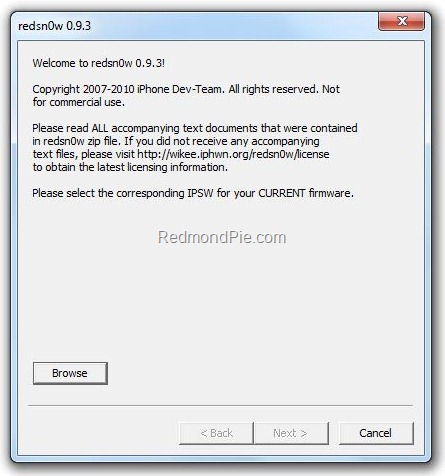
Step 2: Start redsn0w 0.9.3 and point it to the original iPhone 3.1.2 firmware to proceed. This is required because redsn0w 0.9.3 can not read or validate iPhone 3.1.3 firmware.
Step 3: Now select both “Install Cydia” and “Unlock” options.
Step 4: Now make sure your device is both OFF and PLUGGED IN to the computer before you click “Next”.
At this stage you will be presented with a screen where you will have to quickly hold “Power” button and then while holding the “Power” button, you will now have to hold “Home” button too. Now after few seconds release “Power” button but keep holding “Home” button until installation begins.
Step 5: Sit back and enjoy while redsn0w will do all the rest for you. Once done, your iPhone 2G will restart automatically and you will find it jailbroken with iPhone firmware version 3.1.3.
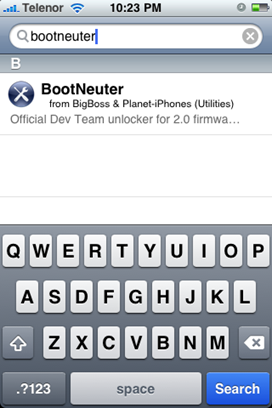
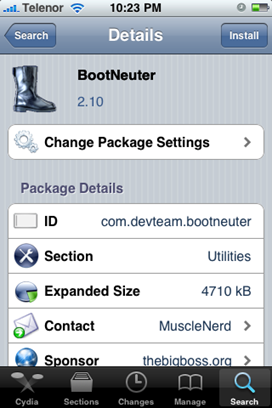
Step 6: Once you are done with the jailbreak, you can now unlock your iPhone 2G running jailbroken firmware 3.1.3 by using BootNeuter app from Cydia. Goto Cydia and search for “BootNeuter” app and install this app. Make sure that you have “BigBoss & Planet-iPhones” repository added in Cydia before you make your search for this app.
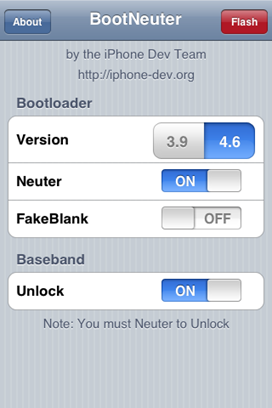
Step 7: Now simply restart your iPhone. When BootNeuter starts, set the settings as shown in the screenshot below in order to make sure that phone is unlocked on 3.1.3 firmware.
Voila! You are now running a fully unlocked and jailbroken iPhone 2G on firmware 3.1.3.
Disclaimer: This guide is for testing & educational purposes only. I’m not responsible for any loss of important data or malfunctioning of your iPhone.
For iPhone 3G and 3GS Users: We strongly suggest that you stay away from this official upgrade until and unless the DevTeam or George Hotz releases new jailbreaking and unlocking tools for 3.1.3 firmware. We will let you know when it will happen
TO UNLOCK IPHONE
Here are the steps that you can follow:
- Launch Cydia
- Please add the repo repo666.ultrasn0w.com to Cydia. That last “o” is actually the number zero “0”. If you use the letter “o” you’ll get an error.
- Then search for ‘ultrasn0w’ in Cydia and install ultrasn0w.
- T-Mobile USA users should disable 3G before using ultrasn0w.
This should successfully unlock your iPhone.
We have already got confirmations from our readers that they’ve successfully unlocked their iPhone 2G iPhone 3G and iPhone 3GS on iPhone OS 3.1.3.
